
ConnectWise Cloud Backup Breach: What Regulated SMBs Should Check in Microsoft 365
Your written backup policy probably says Microsoft 365 is backed up every day. Your vendor policy probably says your IT provider reviews the tools it installs. For many small businesses that use ConnectWise Cloud Backup, formerly SkyKick, both statements stopped being true on October 17, 2026, and most owners have not been told what that means for them.
This post covers what was confirmed, why MFA did not help, what a regulated practice or firm should check in its own Microsoft 365 tenant this week, and what to keep on file for HIPAA, Regulation S-P, the FTC Safeguards Rule, ABA Rule 1.6, and CMMC.
Executive takeaway
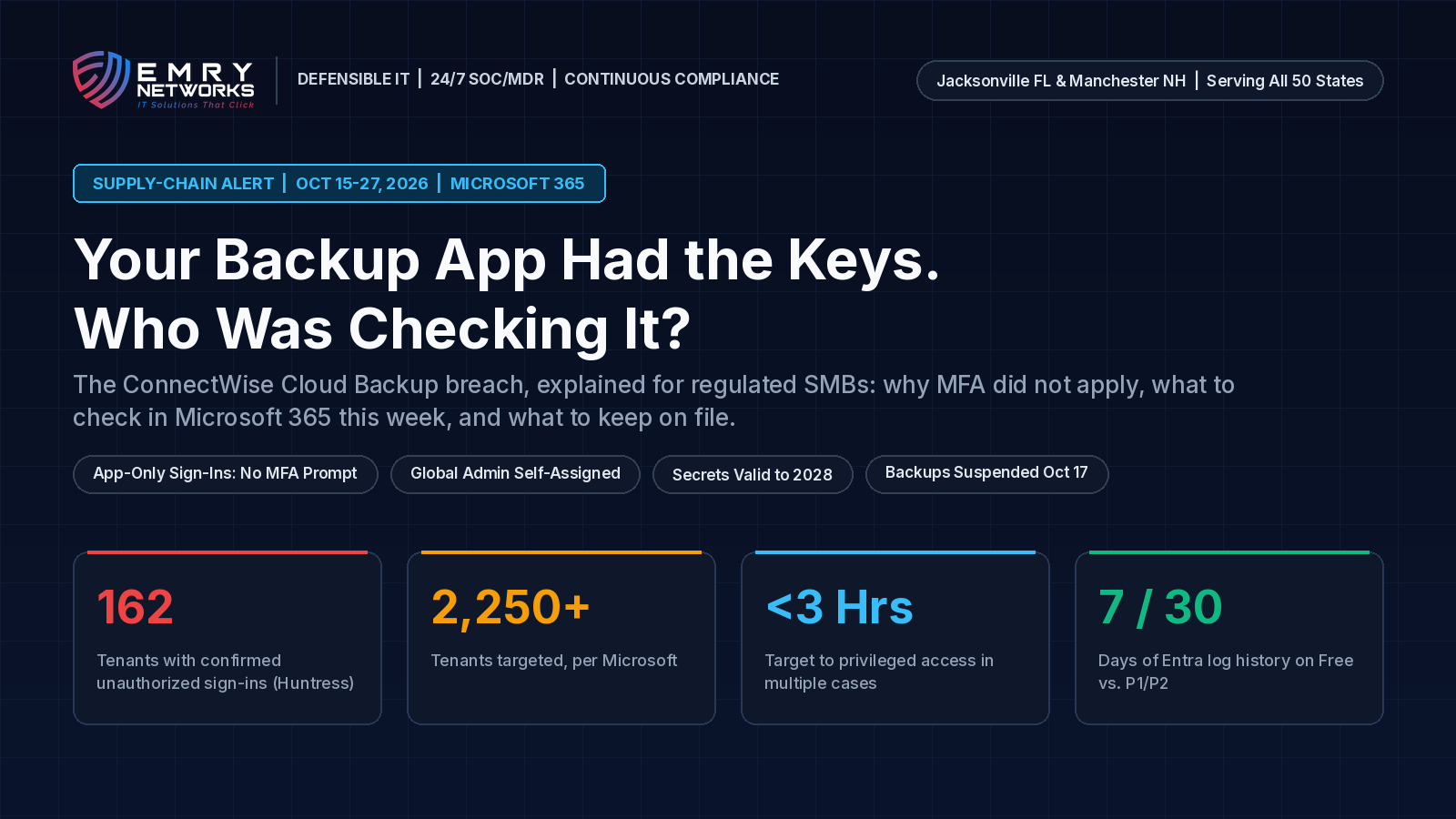
- What happened: An attacker used a stolen credential belonging to the ConnectWise Cloud Backup app to sign in to customer Microsoft 365 tenants on October 15. Huntress confirmed unauthorized sign-ins in 162 tenants and saw activity from the attacker's address in almost 1,000. (Huntress)
- Who is behind it: Microsoft attributes the campaign to Storm-0940, a China-aligned group, which used an open-source agentic AI framework called ARTEX and attempted sign-ins to more than 2,250 tenants. (Microsoft Security Blog)
- Why it matters now: ConnectWise suspended Cloud Backup on October 17. As of its October 27 update, restore access was still waiting on a third-party validation. That is more than ten days without new scheduled backups for affected customers. (ConnectWise)
- The Defensible IT test: Could your IT provider hand you, today, a list of every third-party app with access to your Microsoft 365 data, what each one can read, and the sign-in logs for October 15?
What happened in the ConnectWise Cloud Backup breach?
A credential that lets the ConnectWise Cloud Backup application prove its identity to Microsoft was stolen and used to request access tokens in customer tenants. The credential lived in ConnectWise's own environment, so nothing a customer did could have prevented the sign-in. Huntress watched the app authenticate from a hosting provider address, 144.172.64[.]128, between 06:13 and 08:34 UTC on October 15, moving through tenants a few seconds apart in sorted order. (Huntress)
ConnectWise says it discovered the issue on October 14. On October 17 it disabled seven application identities and suspended Cloud Backup, SaaS Security, and Cloud Management. Scheduled backups, archive access, and restores went offline. ConnectWise says the stored backup archives are encrypted and isolated, with no indication they were compromised. (ConnectWise)
On October 21, Microsoft said the actor reached privileged access in under three hours in multiple cases and listed aerospace and defense, financial services, and legal among the targeted sectors. Microsoft also noted that the presence of the app or a successful sign-in does not by itself prove data was taken. (Microsoft Security Blog, CSO Online)
Why didn't multi-factor authentication stop it?
MFA protects people. This attack used an application. When an app signs in with its own secret or certificate, there is no user, no device, and no MFA prompt, and Conditional Access rules written for users do not apply. Huntress spelled this out in its analysis, and the National Society of IT Service Providers called applications some of the most powerful identities in a tenant. (Huntress, NSITSP)
A backup app needs to read every mailbox, OneDrive, SharePoint site, and Teams chat to do its job. Whoever holds its key inherits that reach.
Is turning off the app enough?
No. In at least two tenants, a second ConnectWise app, Cloud Management for Microsoft Teams, made itself a Global Administrator and then added new secrets to other applications in the tenant. Those secrets were set to stay valid until 2028. Disabling the ConnectWise apps does not remove credentials that were already planted on other apps, and directory reads through Microsoft Graph leave no audit record. (Huntress)
ConnectWise's CTO told CRN that revoking access "does not mean partners are safe," because an attacker who got in can create other accounts and raise privileges. (CRN)
Why is a backup vendor breach a compliance problem for regulated businesses?
Because the rules you answer to hold you responsible for the vendors in your environment, the backups you say you keep, and the evidence you can produce afterward. Your IT provider installed the app. Your firm owns the obligation.
- HIPAA (dental, medical, behavioral health, pharmacies): The Security Rule requires a data backup plan, regular review of information system activity, audit controls, and business associate agreements down the chain. If your only Microsoft 365 backup has been suspended since October 17, your contingency plan and your production environment no longer match. (eCFR, 45 CFR Part 164 Subpart C)
- SEC Regulation S-P (RIAs and broker-dealers): The amended rule requires written oversight of service providers and notice to affected individuals within 30 days of becoming aware that sensitive customer information was, or is reasonably likely to have been, accessed without authorization. (Parker Poe)
- FTC Safeguards Rule (CPA firms, tax preparers, state-registered advisers, mortgage and auto finance): You must oversee service providers and periodically assess them. (eCFR, 16 CFR Part 314)
- Law firms: ABA Model Rule 1.6(c) requires reasonable efforts to prevent unauthorized access to client information. Huntress saw password spraying against four law firm tenants from the same attacker address on October 13 and 14. (ABA)
- Defense contractors (CMMC and NIST SP 800-171): Least privilege and audit logging are assessed controls. A third-party app with tenant-wide write access and no recent review is hard to defend in front of an assessor. (NIST SP 800-171 Rev. 3)
Our IT compliance services and regulated industry IT programs start with exactly this question: which outside tools can touch your regulated data, and who checks them.
Do we have to send breach notices?
Not automatically. A confirmed sign-in is not the same as confirmed access to patient or client records. What you need is a documented investigation of your own tenant that supports whatever conclusion you reach, and a conversation with counsel. Without logs and an app review, you cannot document a "no harm" conclusion with a straight face.
How long do Microsoft 365 sign-in logs last?
Microsoft Entra keeps sign-in and audit records for 7 days on the free tier and 30 days on P1 or P2 licenses. Buying a license later does not bring back expired history. (ConnectWise remediation guidance) For October 15 activity, a 30-day tenant has until about November 14. A free-tier tenant has already lost it.
What should regulated SMBs check in Microsoft 365 this week?
Ask your IT provider to complete these six checks in writing, whether or not you think you used ConnectWise Cloud Backup. Old SkyKick connections from years ago may still be consented in your tenant.
- Export the logs first. Pull Entra sign-in logs, including the service principal sign-ins tab, and the audit log from October 13 forward. Save them outside the tenant.
- Find the apps by ID. In Enterprise applications, search for ConnectWise, SkyKick, and application ID 506e08f9-6e9a-4da4-942b-a099a03644ae. Disable them. Do not delete them, which can complicate investigation and restoration.
- Review every app credential. Look for client secrets or certificates added since October 13 that nobody on your side created, on every application, including your security tools. Remove anything unexpected.
- Strip roles nobody granted. Check whether any ConnectWise or SkyKick service principal holds Global Administrator, Exchange Administrator, or another directory role.
- Check mailbox rules and admin accounts. Look for new forwarding rules, new admin users, and Conditional Access exclusions that list these apps.
- Cover the backup gap. Confirm what your last good backup date is, start a second backup for critical mailboxes and files, and write down the gap and the fix in your compliance file.
What should we ask our IT provider in writing?
- Which third-party applications have consent in our Microsoft 365 tenant today, and what permissions does each one hold?
- Was the ConnectWise or SkyKick app present, and did any sign-ins come from 144.172.64[.]128?
- Were any secrets, certificates, or admin roles added to our tenant between October 13 and today?
- When was our last successful Microsoft 365 backup, and what covers us until restore access returns?
- Where are the logs and findings saved, and who reviewed them?
If your provider cannot answer the first question, put that in the file too.

Standard IT vs. Defensible IT: what is the difference when the vendor is the door?
Standard IT installs the tools it likes, grants them whatever access they ask for, and trusts the vendor to be careful. Defensible IT treats every vendor app as a standing key held by someone else, reviews those keys on a schedule, and keeps the logs that prove what happened.
Standard IT says "the vendor is handling it." Defensible IT can show you which apps had access, what they did on October 15, when your last good backup ran, and who signed off.
Standard IT looks like this:
- Apps consented at onboarding and never reviewed again.
- MFA on users, and nothing watching application sign-ins.
- Default log retention, so the evidence expires before anyone looks.
- One backup vendor, assumed to be working.
- A policy binder that says "vendors are reviewed annually."
Defensible IT looks like this:
- A current list of every enterprise app, its permissions, and its credentials, delivered to you and reviewed quarterly.
- 24/7 managed detection and response that alerts on new app secrets, self-assigned admin roles, and odd service principal sign-ins.
- Logs exported before they expire and kept in your audit binder.
- Backups verified with test restores and a second copy for critical data.
- Compliance-first managed IT services where our own tools are on the review list too.
We wrote more about why monitoring has to cover identities and cloud apps, not just laptops, in our post on managed detection and response for small business.
How does Emry Networks help regulated businesses in Jacksonville FL, Manchester NH, and nationwide?
Emry Networks provides managed IT, cybersecurity, and compliance for regulated small and midsize businesses across the United States, with hubs in the Jacksonville, FL area and the Manchester, NH area. Our work follows a 90-day onboarding blueprint:
- Phase 1 (Days 1-30): Scoping, baseline gap assessment, and software deployment. We inventory every user, device, and third-party app in your Microsoft 365 tenant, record what each app can reach, export logs, and compare your written policies to what is actually running.
- Phase 2 (Days 31-60): Tool implementation and policy authoring. We put the controls in place, including app consent rules, least-privilege permissions, monitoring for credential changes, and verified backups, and we write the policies and vendor oversight procedures that match them.
- Phase 3 (Days 61-90): Verification and a second gap assessment. We check the work, run the gap assessment again, and show you the before and after side by side.
Want to know what is sitting in your tenant? Book a 30-Minute Risk Assessment. We will review your third-party app access, your log retention, and your backup status, and tell you plainly what an auditor or examiner would find.
Next steps for your Microsoft 365 tenant
- Take the free Compliance Readiness Assessment to see how your controls line up with HIPAA, Regulation S-P, CMMC, or SOC 2.
- Use the Breach Cost and Penalty Calculator to estimate what a reportable incident could cost your practice or firm.
- Book a 30-Minute Risk Assessment with our team.
Frequently asked questions
What is the ConnectWise Cloud Backup breach?
A stolen credential for the ConnectWise Cloud Backup app, formerly SkyKick, was used on October 15, 2026 to sign in to customer Microsoft 365 tenants. Huntress confirmed unauthorized sign-ins in 162 tenants, and Microsoft attributes the campaign to the China-aligned group Storm-0940.
Was my Microsoft 365 data stolen?
Not necessarily. A sign-in by the app does not prove data was taken, but some reads leave no audit trail. Your IT provider should review your tenant's logs, app credentials, and admin roles and give you written findings.
Why didn't MFA protect us?
The attacker signed in as an application, not a person. App-only sign-ins involve no user and no MFA prompt, so user-focused protections do not apply.
Are ConnectWise backups working again?
As of ConnectWise's October 27 update, restore access was still pending a required third-party validation, and ConnectWise told customers to keep the affected app connections disabled until formal instructions arrive. Check the ConnectWise Trust Center for the latest status.
Does this breach trigger HIPAA or Regulation S-P notification?
Not automatically. Notification duties depend on whether protected or customer information was accessed or is reasonably likely to have been. Document your investigation and confirm the decision with counsel.
Next steps
See how we help businesses in your industry, or book a short call to talk through where you stand today.
Read more from our team
Explore insights on compliance and security.

Ready to strengthen your compliance?
Get hands-on assessment and guidance from our compliance experts.