
Patched Your Ivanti VPN in October? Patch It Again, Then Check for Intruders

On October 30, CISA added two more Ivanti Connect Secure flaws to its Known Exploited Vulnerabilities (KEV) catalog. Attackers have been chaining them with an authentication bypass that Ivanti disclosed on October 13. Together, the three flaws let someone with no login take root control of the VPN device that sits between the internet and your network. (CISA)
The uncomfortable part is the timing. The fix for the root access flaw shipped on October 29, so a business that patched promptly in mid-October is still exposed. SecurityWeek reports that anyone who installed 25.1.1.2 or 22.8R2.5 needs to upgrade again. (SecurityWeek)
If your practice, firm, or company uses Ivanti Connect Secure for remote access, this is a this-week job. Here is what happened, why one patch is not enough, and what to check, reset, and document.
Watch the 60-Second Briefing: Watch our narrated YouTube Short breaking down the Ivanti Connect Secure attacks and why you need to patch again on YouTube (@emrynetworks).
Executive takeaway
- What happened: Attackers chained CVE-2026-104935 (authentication bypass and code execution), CVE-2026-111357 (privilege escalation to root), and CVE-2026-118527 (file upload to a predictable location) against Ivanti Connect Secure. Volexity saw exploitation begin on October 3, 2026. (Volexity)
- What they took: Domain credentials stored on the VPN, followed by searches of Active Directory for LAPS admin passwords and BitLocker recovery keys. They also deleted log entries.
- What to do: Upgrade to 25.1.1.3 or 22.8R2.6, check for signs of compromise, and reset exposed credentials. CISA warns that Ivanti's Integrity Checker Tool may not detect this activity. (CISA)
- The deadline: Federal civilian agencies had until November 2, 2026 to fix CVE-2026-111357 and have until November 13, 2026 for CVE-2026-118527. Private businesses are not bound by those dates, but attackers are not waiting either.
What happened with Ivanti Connect Secure?
Ivanti Connect Secure is an SSL VPN appliance. Staff use it to reach email, file shares, practice management systems, and line-of-business apps from home. Because it faces the internet and holds credentials, it is one of the most valuable devices a small organization owns.
On October 13, 2026, Ivanti released fixes for CVE-2026-104935, an authentication bypass that also allows remote code execution (CVSS 8.6). CISA added it to the KEV catalog the same day. Volexity, the incident response firm that found the attacks, reported that the victim appliance was fully patched at the time, running 22.8R2.4. (Volexity)
Two more pieces of the chain came out later. CVE-2026-111357 (CVSS 8.8) lets an attacker escalate to root. CVE-2026-118527 (CVSS 4.3) lets an attacker upload files to a location with a predictable name. Ivanti published the fixes on October 29 and CISA added both to the KEV catalog on October 30. (The Hacker News)
Volexity tracks the group as UTA0576. It has low confidence that the group is criminal rather than state-backed. Ivanti says a limited number of customers were affected. A limited number is still a number, and the method is now public.
Which versions are affected?
CISA lists these versions as affected:
- Ivanti Connect Secure 25.1.1.2 and prior
- Ivanti Connect Secure 25.1.2.2 and prior
- Ivanti Connect Secure 22.8R2.5 and prior
The fixed releases are 25.1.1.3 and 22.8R2.6. If you run the 22.8 line, note that CISA lists its end of life as January 31, 2027, so plan the move to 25.x now rather than in January.
Why do we need to patch again after October?
The October 13 release closed the first door. It did not close the root access flaw, because that fix did not exist until October 29. A business that installed 25.1.1.2 or 22.8R2.5 in October did the right thing at the time and still has a known exploited flaw on its edge.
This is the pattern that catches small organizations. A ticket says "Ivanti patched, 10/14," the ticket is closed, and nobody looks again. The vendor advisory gets updated two weeks later and the update does not reach anyone who acts on it.
What did the attackers do once they were inside?
Volexity's write-up reads like a checklist of what a VPN compromise puts at risk:
- Credentials: They pulled domain credentials stored on the appliance for LDAP lookups, then used them for password spraying and Kerberos activity.
- Keys to every laptop: They searched Active Directory for LAPS passwords, which are local admin passwords, and for BitLocker recovery keys, which let someone read an encrypted drive.
- Network listening: They captured LDAP traffic passing through the device.
- Cover-up: They deleted entries from the appliance's debug log and the Linux audit log.
No web shell or malware file was left behind. The commands ran in memory. That is why a scan for "bad files" can come back clean.
Why might the Integrity Checker Tool miss it?
Ivanti's Integrity Checker Tool compares files on the appliance against a known-good list. An attacker who runs commands in memory and edits logs may not change any file the tool checks. CISA says the tool may not detect this compromise and points to network and memory forensics instead.
For a small organization, that means two things. First, logs that live only on the VPN cannot be trusted after a compromise. Second, the useful evidence is usually somewhere else: domain controller logs, firewall logs, and EDR telemetry from the machines the attacker touched next.
What should a regulated business do this week?
Work through this list in order and write down the date and the person for each step.
- Confirm the version. Log in to the appliance and record the exact build. If it is not 25.1.1.3 or 22.8R2.6 or later, schedule the upgrade today.
- Upgrade, even if you patched in October. Treat 25.1.1.2 and 22.8R2.5 as vulnerable.
- Look for signs of compromise before and after. Review domain controller logs for unusual LDAP queries, LAPS and BitLocker key reads, and password spraying since the start of October. Compare VPN logs you exported off the device against what is on it now. Gaps are a finding.
- If anything looks wrong, follow CISA's recovery steps. Back up the configuration, factory reset the appliance, upgrade it (or rebuild it if it is virtual), and restore the configuration. Reset passwords for all accounts, including domain, admin, and local accounts. Revoke and reissue certificates, and reset API keys and license server credentials.
- Rotate what the attackers went looking for. If there is any doubt, rotate LAPS passwords and BitLocker recovery keys.
- Send logs off the device. VPN, firewall, and domain controller logs belong in a system the VPN cannot edit, watched by people who will act at 2 a.m.
What do PCI DSS, NIST 800-171, and HIPAA expect?
The frameworks your auditors and clients use all point to the same habit: fix known flaws on a set clock and keep proof.
- PCI DSS v4.0.1, Requirement 6.3.3: Critical security patches must be installed within one month of release. A practice that takes card payments and routes staff through the VPN to reach payment systems should treat this as in scope. (PCI DSS v4.0.1)
- NIST SP 800-171 Rev. 3, 03.14.01 Flaw Remediation: Identify, report, and correct system flaws, and install security-relevant updates within a time period you define. Defense contractors handling CUI will be asked to show that period and that they met it. (NIST)
- HIPAA Security Rule: A risk analysis that leaves out the remote access device, or log review that relies on logs an attacker can delete, will not hold up after an incident. Our guide to which compliance framework applies to your business covers how these overlap.
What should we ask our IT provider in writing?
- Which version is our VPN running right now, and on what date was it upgraded?
- Did we install the October 29 fix, or only the October 13 one?
- Where are our VPN and domain controller logs stored, and can anyone on the VPN edit them?
- What did you check for compromise, and what did you find?
- Which passwords, certificates, and API keys were reset, and who signed off?
If the answers come back vague, that is the answer.
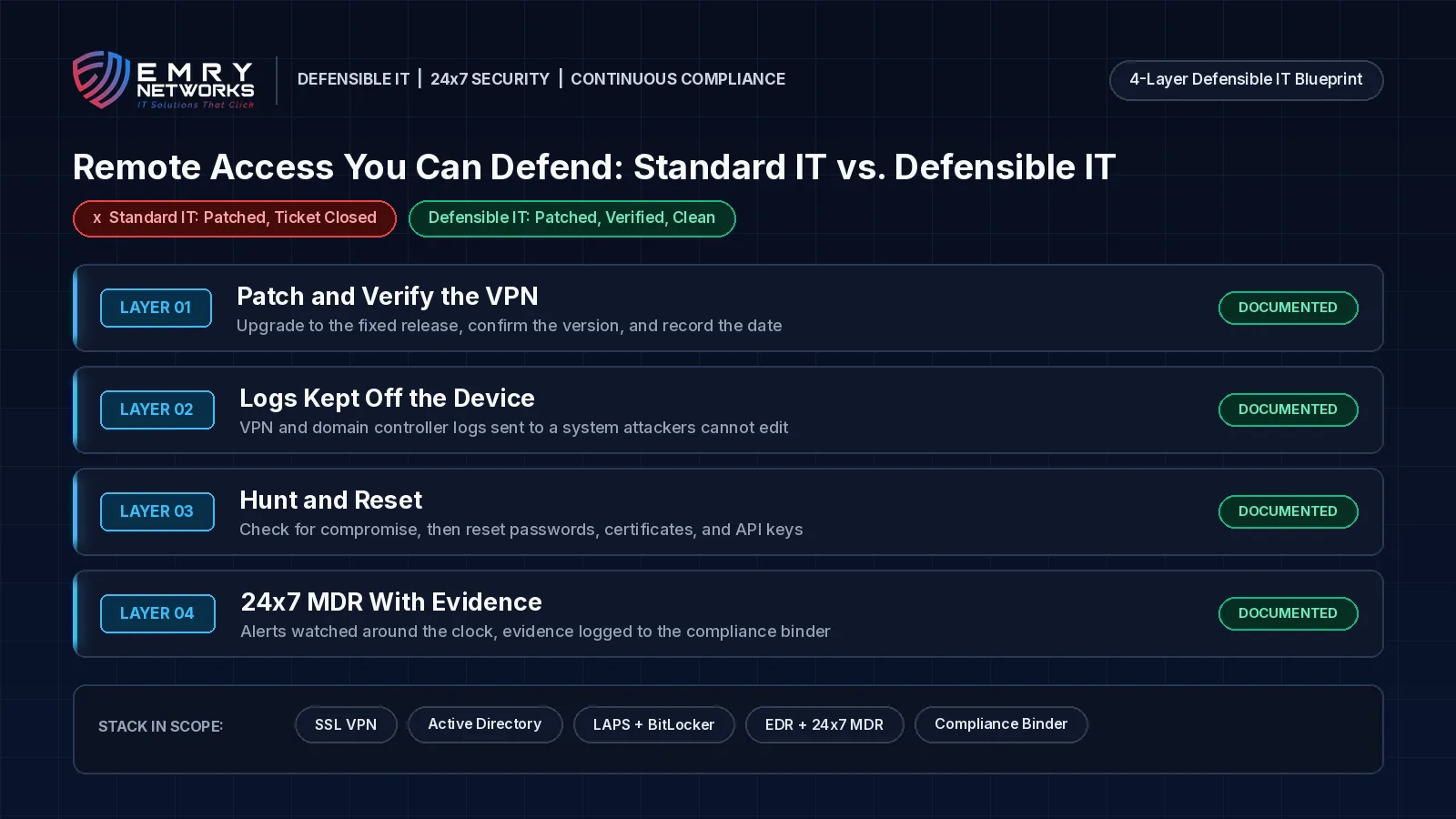
Standard IT vs. Defensible IT: what is the difference for remote access?
Standard IT keeps the VPN working. Defensible IT can prove the VPN is clean.
Standard IT says "we patched it in October." Defensible IT can show the current version, the compromise check, and the credential resets, with dates.
Standard IT looks like this:
- One patch applied when the first advisory came out, ticket closed.
- VPN logs kept only on the VPN.
- The same service account passwords and recovery keys since the VPN was installed.
- Alerts reviewed during business hours.
- No written record a client or auditor could check.
Defensible IT looks like this:
- Same-day critical updates on edge devices, with a re-check whenever a vendor updates an advisory, as part of compliance-first managed IT services.
- VPN, firewall, and domain controller logs sent off the device to a system attackers cannot edit.
- A compromise check after every exploited edge flaw, plus credential and key resets when the evidence calls for it.
- 24x7 managed detection and response, so suspicious LDAP queries at 2 a.m. get a human response.
- Every step recorded in an automatically updated compliance binder.
How does Emry Networks help regulated businesses in Jacksonville FL, Manchester NH, and nationwide?
Emry Networks provides managed IT, cybersecurity, and compliance services for practices that take card payments, medical groups, law firms, defense contractors, and other regulated industries across the United States, from hubs in the Jacksonville, FL and Manchester, NH areas. We work on all-inclusive flat monthly pricing, so an emergency VPN rebuild does not bring a surprise invoice. Every engagement follows a 90-day blueprint:
- Phase 1 (Days 1-30): Scoping, a baseline gap assessment, and software deployment. We inventory every remote access path, confirm VPN and firewall versions, and deploy EDR, logging, and device management.
- Phase 2 (Days 31-60): Tool implementation and policy authoring. We put patching timelines, off-device logging, MFA, and credential rotation in place, and write policies that match what actually runs.
- Phase 3 (Days 61-90): Verification and a second gap assessment. We test the controls, confirm logs reach the right place, and hand you before-and-after evidence.
Not sure your VPN is clean? Book a 30-Minute Risk Assessment. We will review your remote access, your patch records, and where your logs live, and tell you plainly what we find.
Next Steps for Your Business
- Take the free Compliance Readiness Assessment to see where you stand.
- Read our guide on which compliance framework applies to your business.
- Book a 30-Minute Risk Assessment with our team.
Frequently asked questions
Which Ivanti Connect Secure flaws are being exploited?
Three flaws are being chained: CVE-2026-104935 (authentication bypass and remote code execution, CVSS 8.6), CVE-2026-111357 (privilege escalation to root, CVSS 8.8), and CVE-2026-118527 (file upload to a predictable location, CVSS 4.3). CISA added the first on October 13, 2026 and the other two on October 30, 2026.
We patched Ivanti in October. Are we safe?
Not if you stopped at 25.1.1.2 or 22.8R2.5. The fix for the root access flaw shipped on October 29, 2026. Upgrade to 25.1.1.3 or 22.8R2.6, then check for signs of compromise, because patching does not remove an attacker who is already in.
Will Ivanti's Integrity Checker Tool find a compromise?
It may not. CISA says the tool may not detect this activity. The attackers ran commands in memory and deleted log entries, so network and memory forensics, plus logs stored off the device, are more reliable.
What should we reset if our VPN was compromised?
CISA recommends resetting passwords for all accounts, including domain, admin, and local accounts, revoking and reissuing certificates, and resetting API keys and license server credentials. Because the attackers searched for LAPS passwords and BitLocker recovery keys, rotate those as well.
How fast do PCI DSS and NIST 800-171 require critical patches?
PCI DSS v4.0.1 Requirement 6.3.3 requires critical security patches within one month of release. NIST SP 800-171 Rev. 3 control 03.14.01 requires security-relevant updates within a time period your organization defines, so you need to set that period and show you met it.
Next steps
See how we help businesses in your industry, or book a short call to talk through where you stand today.
Read more from our team
Explore insights on compliance and security.

Ready to strengthen your compliance?
Get hands-on assessment and guidance from our compliance experts.