
Fake IT Worker Stole Credentials: Marathon Health Breach Lessons for Practices
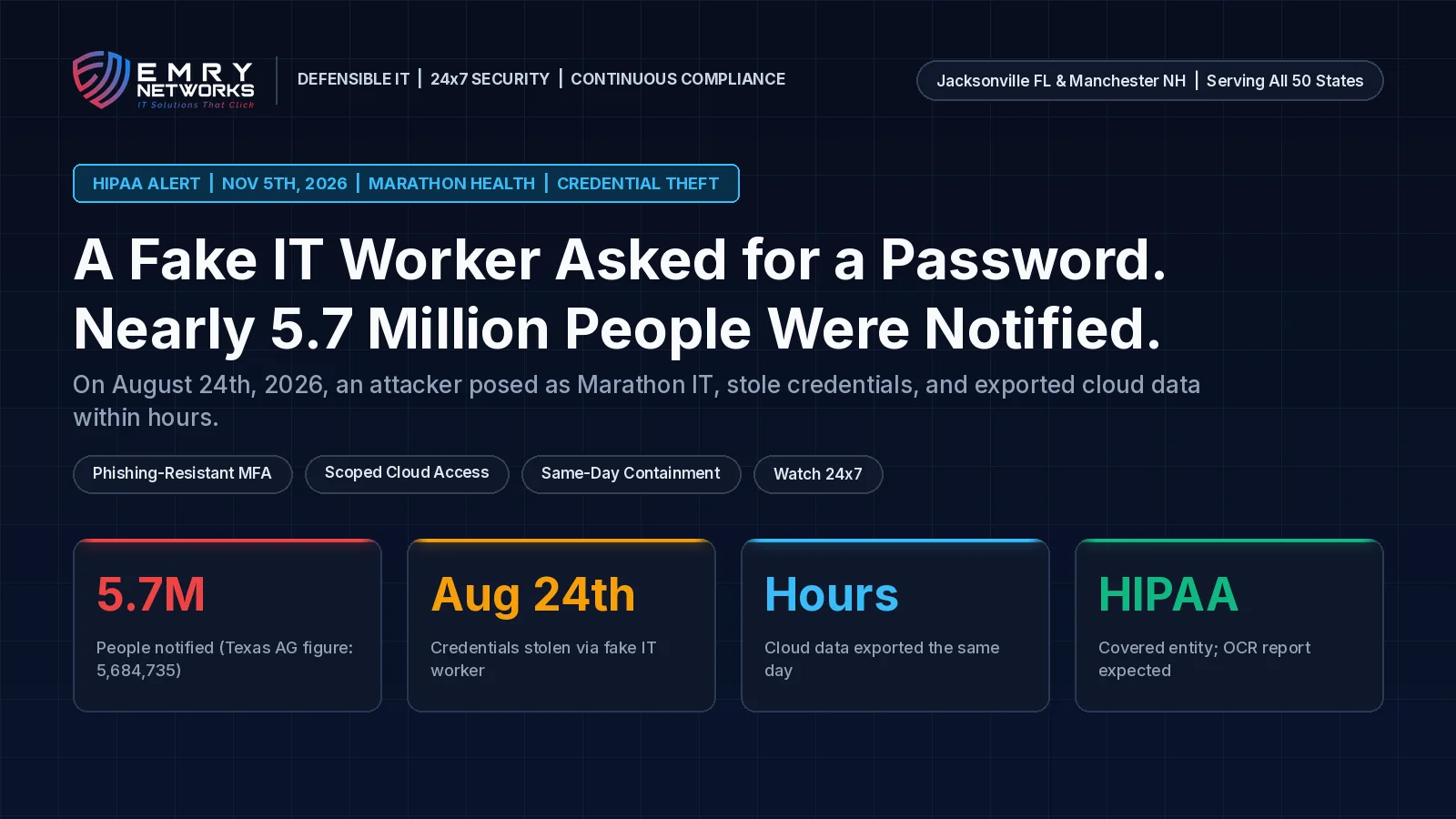
State attorneys general have been told about a Marathon Health data breach that is prompting notices to nearly 5.7 million people. On August 24th, 2026, an unauthorized person posed as a Marathon IT worker, tricked an employee into sharing credentials, and used that login to open a cloud-hosted application. Within a few hours the same day, data was exported from that application. (HIPAA Journal)
Marathon Health is an Indianapolis-based, employer-sponsored primary care provider with onsite and near-site centers across the United States. The California Attorney General breach notice describes how the social engineering call worked. Texas and Vermont attorney general reports also list medical and health insurance information among the data types involved. Notification letters started mailing on October 20th, 2026. (California Attorney General)
For dental and medical practices, and for any regulated business that answers "IT needs your password" calls, this is a clear test of identity controls, cloud access, and who watches for abuse after hours. Here is what to confirm this week.
Watch the 60-Second Briefing: Watch our narrated YouTube Short on the Marathon Health credential-theft breach and what practices must fix this week on YouTube (@emrynetworks).
Executive takeaway
- What happened: On August 24th, 2026, an attacker impersonated Marathon IT, stole employee credentials, and exported data from a cloud-hosted application within a few hours. Nearly 5.7 million people are being notified. The Texas Attorney General figure cited in reporting is 5,684,735. (HIPAA Journal)
- What was exposed: California notices list names, contact information, dates of birth, and Social Security numbers. Texas and Vermont also list medical and health insurance information.
- What to do: Require phishing-resistant MFA for anyone who can reach PHI or cloud admin, scope every cloud role, ban shared helpdesk passwords, and confirm who answers a credential-abuse alert at 2 a.m.
- Standard IT vs. Defensible IT: Standard IT resets the password and closes the ticket. Defensible IT proves who logged in, revokes access the same day, and keeps a person on those alerts overnight.
What happened at Marathon Health?
Marathon Health's California notice states that on August 24th, 2026, the company identified suspicious activity on one employee account, disabled that account, and opened an investigation. The investigation found that an unauthorized individual posed as a Marathon IT worker and tricked the employee into disclosing credentials. Those credentials opened a cloud-hosted application, and the unauthorized individual exported information from it within a few hours on the same day. Marathon completed its review of the impacted data on September 9th, 2026, and began mailing notification letters on October 20th, 2026. (HIPAA Journal)
HIPAA Journal reports that the Massachusetts Attorney General was told 29,075 state residents were affected and Vermont was told 8,858. Texas figures differ by source: a law-firm summary of the Texas Attorney General filing cites 5,684,735 individuals being notified, while the attorney general website lists a smaller count of Texas residents. As a HIPAA-covered entity, Marathon must also report to HHS OCR; as of the November 3rd, 2026 HIPAA Journal report, the incident was not yet listed on the OCR breach portal.
How did the attacker get in?
The entry point was social engineering, not a zero-day. Someone claiming to be Marathon IT persuaded an employee to hand over credentials. Impersonating helpdesk or IT staff is a common tactic used by initial access brokers and groups such as ShinyHunters and Scattered Spider. No public claim of responsibility for this incident has been reported.
What data left the cloud application?
California notices list names, contact information, dates of birth, and Social Security numbers. Texas and Vermont attorney general materials also state that medical information and health insurance information were compromised. Because Marathon receives plan-member data from employer clients to verify coverage and schedule care, some notified people may never have visited a Marathon clinic.
Why does this matter for a small dental or medical practice?
Your front desk and clinical staff answer urgent IT calls every week. Many practices still rely on password MFA, shared "IT helpdesk" accounts, and annual awareness videos. Those controls do not stop a live helpdesk impersonation once the password is spoken aloud or typed into a fake portal.
Cloud apps that hold scheduling, imaging, billing, or EHR data are the same class of target: one compromised login, then a fast export. If nobody is watching credential-abuse alerts overnight, the first human review may arrive the next business morning, after the data is already gone.
Is annual phishing training enough?
No. Training helps staff spot odd emails. It does not replace phishing-resistant authentication, least-privilege cloud roles, short sessions, and a person who can disable an account the same hour abuse is detected.
What is phishing-resistant MFA?
Phishing-resistant MFA means a hardware security key or a platform passkey that cannot be typed into a fake login page or read over the phone. SMS codes, push approvals that can be spammed, and password-only MFA do not meet that bar for anyone who can reach PHI or cloud admin.
What do HIPAA 164.308 and 164.312 expect?
The HIPAA Security Rule expects covered entities and business associates to manage workforce access and to keep technical controls that match how people actually sign in.
- 164.308 (Administrative safeguards): Access management, security awareness, and incident response procedures, including identifying and responding to suspected or known security incidents and documenting outcomes. (eCFR)
- 164.312 (Technical safeguards): Unique user identification, emergency access, automatic logoff, encryption and decryption where appropriate, and audit controls that record and examine activity in systems that contain or use ePHI. (eCFR)
HHS OCR guidance on the Security Rule reinforces the same point: policies alone are not enough if authentication and audit logging do not hold up under a real helpdesk impersonation. (HHS OCR)
RIAs and other financial firms have parallel duties under amended SEC Regulation S-P for vendor and incident response programs. Defense contractors map similar access and monitoring expectations under NIST SP 800-171 Rev. 3. Our guide to which compliance framework applies to your business covers how these overlap.
What should a practice ask its IT provider this week?
Ask for dated answers in writing, not a slide deck.
- Who can reach PHI or cloud admin without a hardware key or passkey? List every account that can still sign in with a password plus SMS or push alone.
- Which cloud apps can each role open, and how long do sessions last? Shared front-desk or "IT" logins should be gone.
- If a credential is abused at 2 a.m., who answers, and where is that logged? Name the person or MDR team and the evidence location.
- When was the last suspicious login disabled the same day? Ask for the ticket or case ID and the timestamps.
- Are helpdesk password resets verified out of band? Confirm the callback process uses a known number, not the number on the inbound call.
- Save the answers. Put the written replies, dates, and reviewer name in your HIPAA risk analysis and incident response file.
What if we already took a suspicious IT call?
Treat the account as compromised until proven otherwise. Disable the user, revoke cloud and VPN tokens, reset related passwords from a known-good device, preserve sign-in and export logs before cleanup, and open your incident response plan. If ePHI may have been accessed, document the awareness date and involve privacy counsel.

Standard IT vs. Defensible IT: reset the password or prove who got in?
Standard IT resets the password after a bad call and closes the ticket. Defensible IT can show who authenticated, what was accessed, when access was revoked, and who watched the overnight alerts.
Standard IT says "we reset their password." Defensible IT can show the phishing-resistant MFA enrollment, the scoped cloud role, the same-day disable and token revoke, and the 24x7 case notes, with dates.
Standard IT looks like this:
- Password MFA and yearly awareness training treated as enough.
- Shared helpdesk or front-desk cloud logins still in use.
- Credential-abuse alerts reviewed during business hours only.
- A closed ticket counted as the finish line, with thin evidence for an auditor.
Defensible IT looks like this:
- Hardware keys or passkeys for anyone who can reach PHI or cloud admin, delivered through compliance-first managed IT services.
- Least-privilege cloud roles, short sessions, and no shared IT passwords.
- Same-day containment: disable the account, revoke tokens, and preserve logs before cleanup.
- 24x7 managed detection and response so a 2 a.m. credential-abuse alert gets a human response that night, with notes that land in the compliance binder.
How does Emry Networks help regulated businesses in Jacksonville FL, Manchester NH, and nationwide?
Emry Networks provides managed IT, cybersecurity, and compliance services for medical and dental groups, law firms, financial advisors, defense contractors, and other regulated industries across the United States, from hubs in the Jacksonville, FL and Manchester, NH areas. We work on all-inclusive flat monthly pricing, so an overnight incident response does not bring a surprise invoice. Every engagement follows a 90-day blueprint:
- Phase 1 (Days 1-30): Scoping, a baseline gap assessment, and software deployment. We inventory identities, cloud apps, and admin paths to PHI, confirm MFA strength, and deploy EDR, logging, and device management.
- Phase 2 (Days 31-60): Tool implementation and policy authoring. We enroll phishing-resistant MFA, tighten cloud roles and session lifetimes, route credential-abuse alerts to 24x7 coverage, and write policies that match what actually runs.
- Phase 3 (Days 61-90): Verification and a second gap assessment. We test that alerts reach a person at any hour, confirm fixes, and hand you before-and-after evidence.
Not sure your identities and cloud apps would survive a fake IT call? Book a 30-Minute Risk Assessment. We will review who can reach PHI, how they authenticate, and who answers after-hours alerts, and tell you plainly what we find. Prefer the phone? Call (603) 202-3200.
Next Steps for Your Business
- Take the free Compliance Readiness Assessment to see where you stand.
- Read our guide on which compliance framework applies to your business.
- Book a 30-Minute Risk Assessment with our team.
Frequently asked questions
What happened in the Marathon Health breach?
On August 24th, 2026, an attacker posed as a Marathon IT worker, stole an employee's credentials, and exported data from a cloud-hosted application within a few hours. Nearly 5.7 million people are being notified. Notification letters started mailing on October 20th, 2026.
What data was exposed?
California notices list names, contact information, dates of birth, and Social Security numbers. Texas and Vermont attorney general materials also list medical and health insurance information.
Why should a small practice care about a large provider breach?
Small practices use the same helpdesk habits and cloud apps. A fake IT call that steals one login can open scheduling, billing, or EHR data within hours if MFA is weak and nobody watches overnight alerts.
Is password MFA enough against IT impersonation?
No. SMS codes and push prompts can be phished or social-engineered. Anyone who can reach PHI or cloud admin should use a hardware security key or passkey that cannot be typed into a fake page or read over the phone.
How does 24x7 MDR differ from a business-hours ticket queue?
A business-hours queue may not see a 2 a.m. credential-abuse alert until the next morning. 24x7 managed detection and response puts a person on that alert the same night, disables access, and leaves dated evidence for your auditor.
Next steps
See how we help businesses in your industry, or book a short call to talk through where you stand today.
Read more from our team
Explore insights on compliance and security.

Ready to strengthen your compliance?
Get hands-on assessment and guidance from our compliance experts.