
Outlook Zero-Day CVE-2026-124194: The Patch Proof PCI DSS Practices Should Ask For

On Tuesday, November 10th, 2026, Microsoft released a fix for CVE-2026-124194, a flaw in Outlook for Windows that Microsoft says attackers are already exploiting. (Microsoft Security Response Center) CISA added it to its Known Exploited Vulnerabilities (KEV) catalog the same day. It set a November 24th, 2026 remediation deadline for federal civilian agencies. (CISA KEV) If someone opens a crafted message file, Outlook can connect to a server the attacker controls without showing the usual warning and hand over the user's Windows sign-in hash, which the attacker can use to log in as that person.
For medical, dental, veterinary, and other practices that accept card payments, the risk sits at the front desk. The PCs that open patient and client attachments all day are the ones to check first, and your managed service provider (MSP) may be the one pushing those updates. So ask one question this week: can your MSP show the fixed Office build on every PC that runs Outlook, with a date?
Watch the 60-Second Briefing: Watch our narrated YouTube Short on the Outlook zero-day and what to ask your MSP, on YouTube (@emrynetworks).
What should card-accepting practices take away from CVE-2026-124194?
CVE-2026-124194 shows that "updates are set to automatic" is not proof. Microsoft says the flaw is exploited, CISA set a November 24th, 2026 federal deadline, and a PCI DSS 4.0.1 assessor can ask for dated proof of the installed Office build. The one-month patch window in Requirement 6.3.3 applies only if your own 6.3.1 ranking treats the issue as critical.
- What happened: Microsoft fixed CVE-2026-124194 in its November 10th, 2026 security updates and marked it "Exploitation Detected." CISA added it to KEV on November 10th, 2026, with a November 24th, 2026 federal deadline.
- Who is affected: Outlook for Windows in Microsoft 365 Apps for Enterprise, Office LTSC 2021, and Office LTSC 2024, both 32-bit and 64-bit. (NVD)
- What to do: Update Office, confirm the fixed build on every PC that runs Outlook, block outbound SMB at the firewall, and save a dated build report.
- Standard IT vs. Defensible IT: Standard IT pushes updates. Defensible IT shows the build on every PC, with a dated report your PCI DSS assessor can sample.
What is CVE-2026-124194?
Microsoft calls CVE-2026-124194 an Outlook spoofing vulnerability: Outlook fails to warn the user before an unsafe action. An attacker sends a specially crafted message file and convinces the user to open it. Opening the file can make Outlook connect to an attacker-controlled network location without the usual external-content warning. Microsoft says this discloses the user's NTLMv2 hash, which the attacker can use to authenticate as the user. Microsoft rates it Moderate, with a CVSS score of 6.5. (Microsoft Security Response Center, NVD)
Is it being exploited?
Yes. Microsoft lists it as "Exploitation Detected" and says it was not publicly disclosed before the fix. CISA added it to its Known Exploited Vulnerabilities catalog on November 10th, 2026. Neither Microsoft nor CISA has shared details of the attacks, and CISA lists known ransomware campaign use as unknown. (CISA KEV, Microsoft Security Response Center, NVD)
Which versions are affected, and what are the fixed builds?
Microsoft lists three Office editions, 32-bit and 64-bit:
- Office LTSC 2021: fixed in build 16.0.14334.21048.
- Office LTSC 2024: fixed in build 16.0.17932.21140.
- Microsoft 365 Apps for Enterprise: Current Channel Build 20527.20196 and Semi-Annual Enterprise Channel Build 20527.20192. Other channels have their own fixed builds in Microsoft's Office security release notes. Ask for the channel and the exact build, not a version label alone.
Office 2016 and Office 2019, and the new Outlook, are not on Microsoft's affected-product record for this CVE. A November 10th Office 2019 volume-license build appeared in Microsoft's Office security updates that day; that is not a stated fix for CVE-2026-124194.
In classic Outlook, File, then Office Account, then About Outlook shows the exact version. (NVD, Microsoft Security Response Center, Office security release notes)
Does the Preview Pane trigger it?
No. Microsoft says the Preview Pane is not an attack vector. The user has to open the malicious file, which is why the front desk and billing staff who open attachments all day are the people to protect first.
Why does this matter for a practice that accepts card payments?
It matters because PCI DSS 4.0.1 judges what is running in production today, not the policy binder, and your MSP's patch dashboard is not the same as proof.
Front desk staff open referrals, insurance forms, and invoices from outside senders all day. A leaked sign-in hash from that PC can give an attacker a foothold on your network. PCI DSS 4.0.1 asks for three things that this flaw tests directly:
- Requirement 6.3.1 and 6.3.3: rank vulnerabilities by risk, and install patches for critical ones within one month of release. Microsoft rated this flaw Moderate (CVSS 6.5). PCI DSS does not automatically put a vendor-Moderate CVE on a one-month clock. Active exploitation and the CISA KEV listing are common reasons to rank it critical under your own 6.3.1 process; document that ranking.
- Requirement 5.4.1: processes and automated mechanisms to detect and protect staff against phishing.
- Requirement 12.8: manage your service providers, including a written list of which requirements your MSP handles and which you handle (12.8.5). Using an MSP does not remove your own responsibility.
(PCI DSS v4.0.1, PCI Security Standards Council)
Is "Office updates itself" enough for an assessor?
No. An assessor can sample a PC and ask for its Office build, the date the fix landed, and who checked. One PC stuck on a paused update or an old channel undercuts the whole claim. For an example of dated, per-system evidence an assessor can sample, see our HIPAA audit readiness case study. That engagement was HIPAA, but the evidence standard is the same kind of proof a PCI DSS assessor will want for Office builds.
What five questions should a practice ask its MSP this week?
Ask for dated answers in writing. They show whether the fix is actually on every PC, or only on a dashboard that says "compliant."
- Which PCs run classic Outlook, and on which Office edition and update channel? Include front desk, billing, and any home or shared PCs.
- Which of them show the fixed build today? Office LTSC 2021 needs 16.0.14334.21048, Office LTSC 2024 needs 16.0.17932.21140, and Microsoft 365 Apps needs the fixed build for its channel (Current Channel Build 20527.20196, Semi-Annual Enterprise Channel Build 20527.20192). Ask for the report with a date.
- Is outbound SMB blocked at the firewall? Blocking outbound SMB (TCP port 445) is a common hardening step that limits where Windows will send sign-in hashes.
- Who reviews odd sign-ins overnight, and where is that logged? Name the person or MDR team and the evidence location.
- Does our PCI DSS responsibility list say who owns Office patching? If it is the MSP, the list should say so, and you should still keep the proof.
Save the answers, dates, and reviewer name in your PCI DSS evidence folder.
What if someone already opened a suspicious file?
Update that PC first, then treat the user's account as possibly exposed. Reset the user's password, check for sign-ins from unknown places or devices, preserve logs before cleanup, and open incident response if anything does not match a known user.
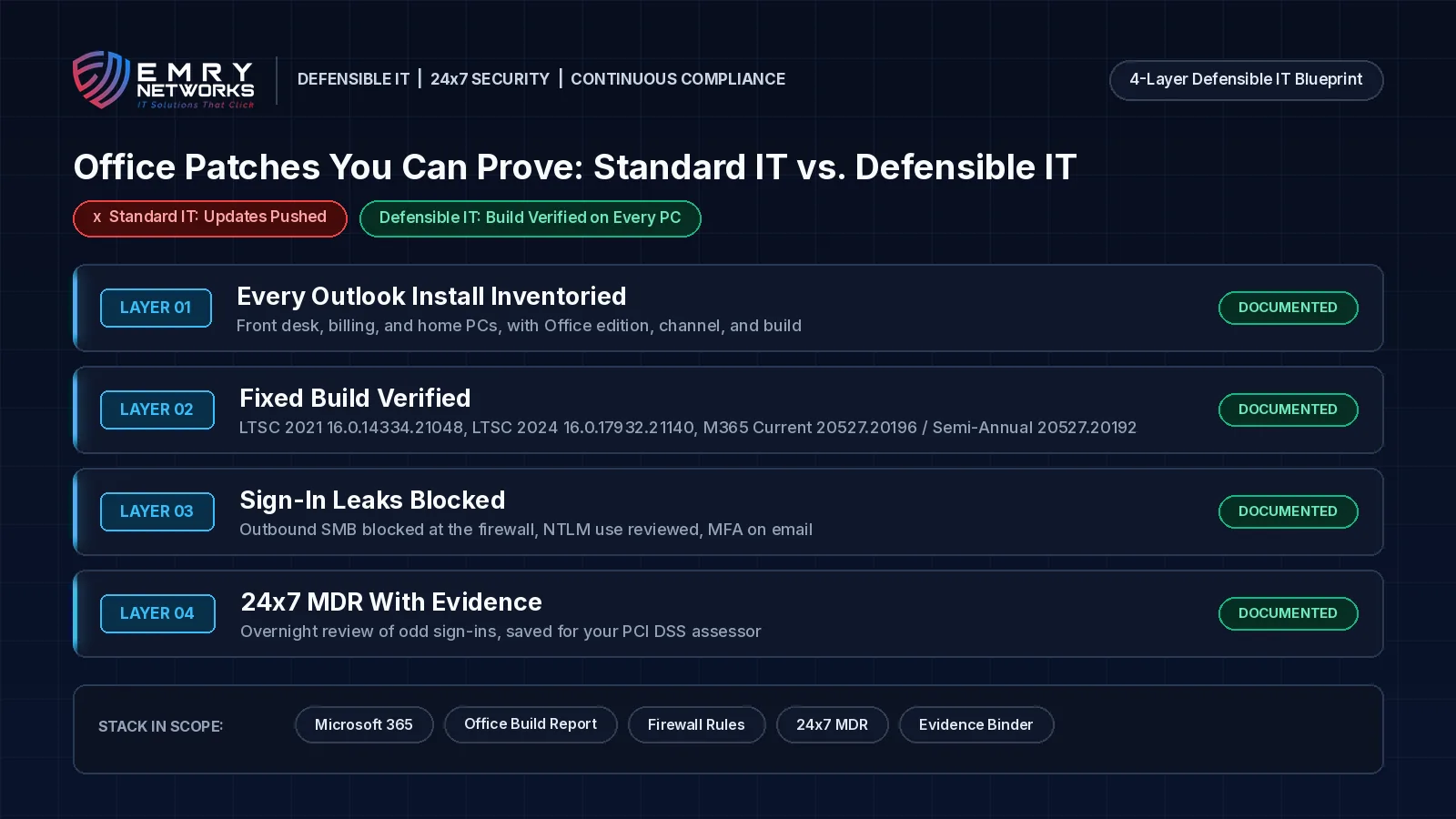
How does Standard IT differ from Defensible IT after CVE-2026-124194?
Standard IT sets Office updates to automatic and assumes they landed. Defensible IT keeps a dated list of every PC that runs Outlook, its Office edition and build, whether outbound SMB is blocked, and who reviewed overnight sign-ins.
Standard IT says "updates are automatic." Defensible IT can show the build on every PC, the date it changed, the firewall rule, and the 24x7 case notes.
Standard IT looks like this:
- Office updates set to automatic; nobody checks which PCs actually took them.
- A patch dashboard that rolls up to "compliant" without build numbers.
- Outbound SMB left open at the firewall.
- No written split of patching duties between the practice and the MSP.
Defensible IT looks like this:
- An inventory of every PC that runs Outlook, with edition, channel, and build, kept current through compliance-first managed IT services.
- KEV items treated as urgent and tracked per device (the November 24th, 2026 date is the federal civilian deadline and a useful private-sector benchmark; PCI DSS uses your own risk ranking and its one-month window for critical patches).
- Outbound SMB blocked, NTLM use reviewed, and MFA on email accounts.
- 24x7 managed detection and response so an odd 2 a.m. sign-in gets a human response that night, with dated notes saved to your evidence folder.
How does Emry Networks help regulated businesses in Jacksonville FL, Manchester NH, and nationwide?
Emry Networks provides managed IT, cybersecurity, and IT compliance program support for medical and dental groups, veterinary clinics, law firms, financial advisors, defense contractors, and other regulated industries. We serve regulated SMBs nationwide from hubs in the Jacksonville, FL and Manchester, NH areas. Pricing is all-inclusive and flat monthly, so overnight incident response does not bring a surprise invoice. Every engagement follows the 3-phase Emry Assurance Roadmap (often delivered as a 90-day blueprint):
- Phase 1 - Red Zone (Regulatory Discovery): Inventory every PC and Office install, map MSP access and patch duties, and deploy EDR, logging, and device management.
- Phase 2 - Transition (Security Hardening Sprint): Push and verify fixed Office builds, block outbound SMB, turn on MFA for email, and route sign-in alerts to 24x7 coverage.
- Phase 3 - Green Zone (Continuous Management & Drift Control): Recheck builds every patch cycle, confirm nothing drifted, and hand you dated before-and-after evidence for your PCI DSS assessor.
Not sure every front desk PC would pass this check? Book a 30-Minute Risk Assessment. In thirty minutes we review your Office builds, patch evidence, and MSP access, then tell you plainly what we find. Prefer the phone? Call (603) 202-3200.
What are the next steps for your practice?
Book a 30-Minute Risk Assessment to review your Office builds, patch evidence, and MSP access. Before that call, get a dated report of the Office build on every PC that runs Outlook, confirm outbound SMB is blocked, and write down who owns Office patching.
- Book a 30-Minute Risk Assessment with our team. Prefer the phone? Call (603) 202-3200.
- Take the free Compliance Readiness Assessment to see where you stand.
- See how we document dated audit evidence in our HIPAA audit readiness case study (a model for PCI DSS patch proof, even though that engagement was HIPAA).
Frequently asked questions
What is the Outlook CVE-2026-124194 vulnerability?
It is an Outlook for Windows spoofing flaw. If a user opens a crafted message file, Outlook can connect to an attacker-controlled server without the usual warning and disclose the user's NTLMv2 sign-in hash, which can be used to log in as that user. Microsoft fixed it on November 10th, 2026 and rates it Moderate, with a CVSS score of 6.5.
Is CVE-2026-124194 being exploited?
Yes. Microsoft lists it as "Exploitation Detected," and CISA added it to its Known Exploited Vulnerabilities catalog on November 10th, 2026, with a November 24th, 2026 federal civilian deadline.
Which Office builds fix it?
Office LTSC 2021 build 16.0.14334.21048, Office LTSC 2024 build 16.0.17932.21140, and, for Microsoft 365 Apps for Enterprise, Current Channel Build 20527.20196 and Semi-Annual Enterprise Channel Build 20527.20192, or the fixed build listed for your update channel in Microsoft's Office security release notes. The Preview Pane is not an attack path; the user has to open the file.
What does PCI DSS 4.0.1 expect after a flaw like this?
Requirement 6.3.3 expects patches for critical vulnerabilities within one month of release, using your own risk ranking from Requirement 6.3.1. Requirement 5.4.1 expects anti-phishing controls, and Requirement 12.8 expects you to manage your service providers, even when your MSP does the patching.
How does 24x7 MDR differ from a business-hours ticket queue?
A business-hours queue may not see an odd 2 a.m. sign-in until the next morning. 24x7 managed detection and response puts a person on that alert the same night and leaves dated evidence for your security file.
Next steps
See how we help businesses in your industry, or book a short call to talk through where you stand today.
Read more from our team
Explore insights on compliance and security.

Ready to strengthen your compliance?
Get hands-on assessment and guidance from our compliance experts.