
Synology NAS Ransomware: Update DSM, Close the Login Page, and Get a Backup Off the Box

On October 29th, 2026, Synology warned customers that attackers are breaking into Synology NAS devices running outdated DSM software and encrypting the files on them. Synology says the attackers are exploiting a vulnerability it patched in December 2024, and it is telling every customer to update immediately and turn on automatic updates. (Synology)
The ransomware is called C3RB3R. Victims find their files renamed with a .L0CK3D extension and a ransom note named read-me3.txt, and are pushed to buy a decryptor. Shadowserver tracks more than 380,000 Synology NAS devices exposed to the internet. (BleepingComputer)
For many dental groups, law firms, accounting practices, and small manufacturers, the Synology box in the closet is both the shared drive and the place the backups land. When it gets encrypted, the working files and the safety net go together. Here is what to update, what to close, and what to test this week.
Watch the 60-Second Briefing: Watch our narrated YouTube Short breaking down the Synology NAS ransomware warning and what to fix this week on YouTube (@emrynetworks).
Executive takeaway
- What happened: C3RB3R ransomware is encrypting Synology NAS devices that run outdated DSM. Synology posted its warning on October 29th, 2026.
- The flaw Synology points to: Advisory Synology-SA-24:20, published November 5th, 2024. Its most serious bug, CVE-2024-10441, lets a remote attacker run code with no login and is rated CVSS 9.8. (Synology-SA-24:20)
- What to do: Update DSM to the latest build for your model, turn on automatic updates, take the DSM login page off the internet, and make sure a copy of your data lives somewhere the NAS cannot reach.
- The catch: Updating closes the hole. It does not decrypt files that are already locked. (HKCERT)
What is happening to Synology NAS devices?
DSM is the operating system that runs on Synology NAS devices. Synology's October 29th, 2026 statement says the attacks "aim to encrypt data and extort ransom" and target devices that never received a vulnerability fix released in December 2024. It refers customers to advisory Synology-SA-24:20.
That advisory covers three bugs reported through the Pwn2Own 2024 hacking contest:
- CVE-2024-10441 (CVSS 9.8): lets a remote attacker run code on the device with no login.
- CVE-2024-50629 (CVSS 5.3): lets a remote attacker read limited files.
- CVE-2024-10445 (CVSS 4.3): lets a remote attacker write limited files.
BleepingComputer reports that the first victim reports surfaced more than two weeks before its November 2nd, 2026 story. (BleepingComputer) Some researchers have also tied cases to two newer flaws, CVE-2026-13684 and CVE-2026-13639, which Synology fixed on September 18th, 2026 in advisory Synology-SA-26:13. (Synology-SA-26:13) Which bug opened which door is still being sorted out. The fix for a business is the same either way: run the latest DSM build for your model.
Which DSM versions are affected?
Synology-SA-24:20 lists these as the first fixed releases:
- DSM 7.2.2: 7.2.2-72806-1 or later
- DSM 7.2.1: 7.2.1-69057-6 or later
- DSM 7.2: 7.2-64570-4 or later
- DSM 7.1: 7.1.1-42962-7 or later
- DSM 6.2: 6.2.4-25556-8 or later
Treat those numbers as the floor. Synology-SA-26:13 lists later fixes, including 7.2.2-72806-9, 7.2.1-69057-12, 7.3.2-86009-4, and 7.4-90075. A device that clears the 2024 floor can still be missing the September 2026 fix. (The Hacker News)
Why is a NAS hit harder than a laptop?
A ransomware infection on one laptop is a bad day. An infection on the NAS can take out the whole office, because the NAS usually holds:
- The shared drive everyone works from: client files, patient images, scanned records, and contracts.
- Backups of the other computers, written there every night.
- Sometimes the only copy of older records nobody has opened in years.
If the backup lives on the same device, or on a share the NAS can write to, it gets encrypted with everything else. That is the gap this campaign exploits.
Is CVE-2024-10441 in CISA's KEV catalog?
Not as of CISA's October 30th, 2026 catalog update. That matters if your IT provider patches only what appears on the Known Exploited Vulnerabilities list. Synology's own warning is the alert here, and the flaw is nearly two years old. (CISA KEV)
What should a regulated business do this week?
Work through this list in order and write down the date and the person for each step.
- Find every Synology device. Include the one at the second office and the one a vendor installed for imaging or scanning. Record the model and DSM build of each.
- Update DSM to the latest build for your model. Then turn on automatic updates, as Synology recommends. Update the installed packages too.
- Take the DSM login page off the internet. Remove port forwarding to the NAS on your firewall and reach DSM over a VPN only. Turn off services you do not use. HKCERT and BleepingComputer both advise blocking internet access to the management interface.
- Check for signs someone was already in. Look for admin accounts and scheduled tasks nobody on your team created, and for files with the .L0CK3D extension.
- Get a copy off the box. Keep at least one backup that is offline or immutable, stored somewhere the NAS cannot reach, write to, or delete.
- Restore something. Pull a real file and a full folder back from that copy, time it, and record who checked it.
What if files are already locked?
Follow HKCERT's response steps. Disconnect the NAS from the network and pause the sync and backup jobs that touch it, so the damage does not spread to your other copies. Keep the ransom note, a few encrypted files, and the logs, and avoid resetting, formatting, or restarting the device before evidence is preserved. Patch, reset credentials, and restore from a backup you have confirmed is clean. HKCERT also notes that paying does not guarantee you get your data back. (HKCERT)
What do HIPAA, Reg S-P, and NIST 800-171 expect?
The rules your auditors and clients point to all ask the same question after an incident: could you recover, and can you prove you were keeping up?
- HIPAA: HHS OCR's ransomware guidance says that when ePHI is encrypted by ransomware, a breach is presumed unless the practice can show a low probability that the data was compromised, based on a four-factor risk assessment. A tested contingency and backup plan is part of that case. (HHS OCR)
- SEC Regulation S-P: Smaller RIAs and broker-dealers had to comply with the amended rule by June 3rd, 2026. It requires a written incident response program and notice to affected customers no later than 30 days after you learn of unauthorized access to sensitive customer information. (SEC)
- NIST SP 800-171 Rev. 3, 03.14.01 Flaw Remediation: Defense contractors handling CUI must install security-relevant updates within a time period they define. A NAS holding CUI that missed a December 2024 fix is a hard finding to explain. (NIST)
Our guide to which compliance framework applies to your business covers how these overlap.
What should we ask our IT provider in writing?
- Which DSM build is each of our Synology devices running, and on what date was it last updated?
- Can anyone reach the DSM login page from the internet? How did you check?
- Where is the copy of our data that the NAS cannot reach or delete?
- When did we last restore from that copy, how long did it take, and who signed off?
- Who sees an alert if files on the NAS start changing in bulk at 2 a.m.?
If the answers come back vague, that is the answer.
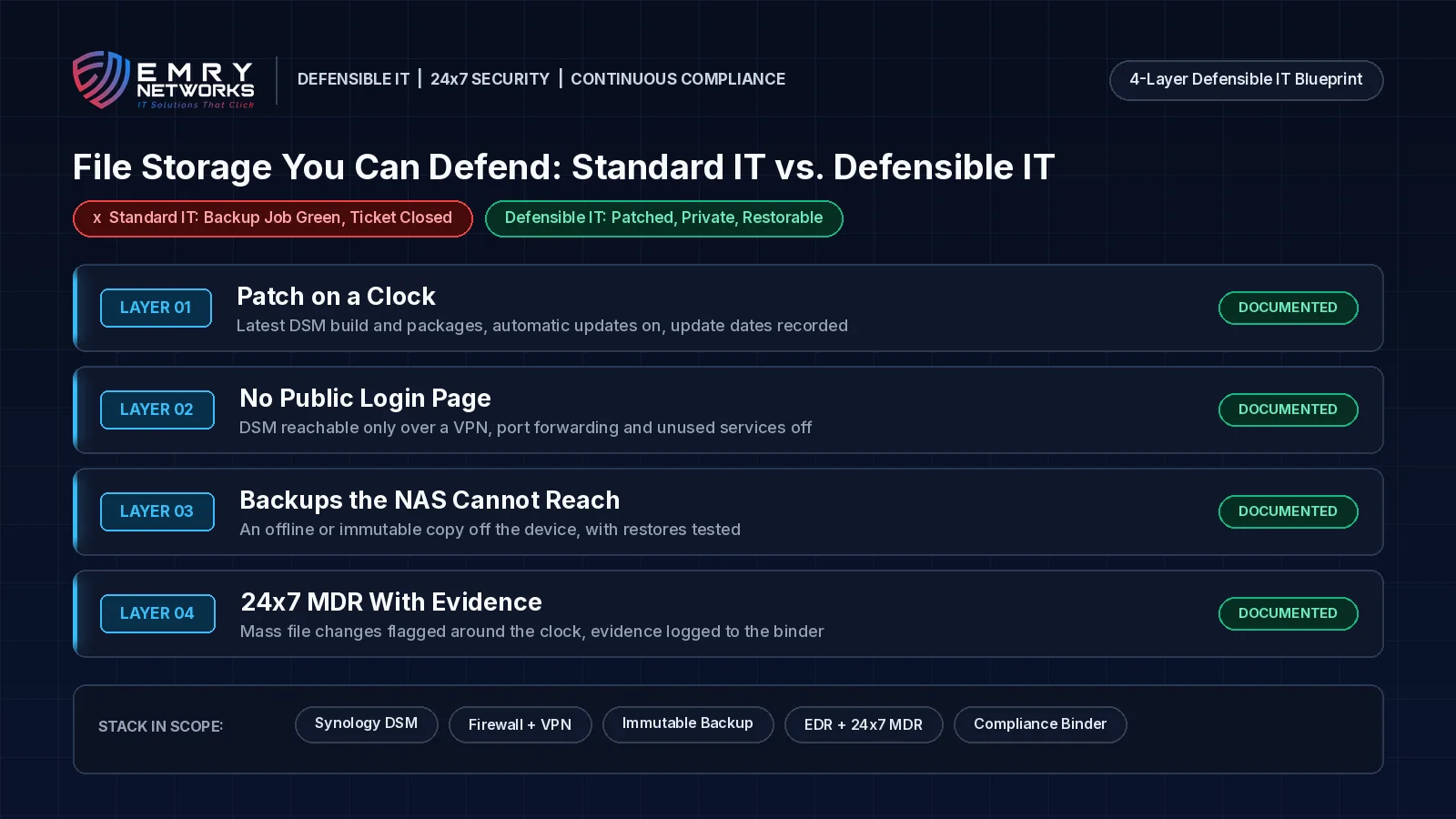
Standard IT vs. Defensible IT: what is the difference for file storage?
Standard IT keeps the NAS running. Defensible IT can prove you would get the data back.
Standard IT says "the backup job is green." Defensible IT can show the DSM build, the closed firewall rule, the offline copy, and the last restore test, with dates.
Standard IT looks like this:
- DSM updated when someone remembers, often years apart.
- The login page reachable from the internet for convenience.
- Backups written to the same NAS, or to a share it can reach.
- A green backup job treated as proof, ticket closed.
- Alerts reviewed during business hours.
Defensible IT looks like this:
- Same-day critical updates on servers and storage, with dates recorded, as part of compliance-first managed IT services.
- DSM management reachable only over a VPN.
- At least one offline or immutable copy the NAS cannot touch, with restores tested on a schedule set by your risk.
- 24x7 managed detection and response, so mass file changes at 2 a.m. get a human response.
- Every step recorded in an automatically updated compliance binder.
How does Emry Networks help regulated businesses in Jacksonville FL, Manchester NH, and nationwide?
Emry Networks provides managed IT, cybersecurity, and compliance services for medical and dental groups, law firms, financial advisors, defense contractors, and other regulated industries across the United States, from hubs in the Jacksonville, FL and Manchester, NH areas. We work on all-inclusive flat monthly pricing, so an emergency NAS rebuild does not bring a surprise invoice. Every engagement follows a 90-day blueprint:
- Phase 1 (Days 1-30): Scoping, a baseline gap assessment, and software deployment. We inventory every server, NAS, and backup target, confirm firmware and DSM builds, check what is exposed to the internet, and deploy EDR, logging, and device management.
- Phase 2 (Days 31-60): Tool implementation and policy authoring. We put patching timelines, offline or immutable backups, MFA, and firewall rules in place, and write policies that match what actually runs.
- Phase 3 (Days 61-90): Verification and a second gap assessment. We run restore tests, confirm alerts reach the right people, and hand you before-and-after evidence.
Not sure your NAS is safe? Book a 30-Minute Risk Assessment. We will review your file storage, your backups, and what you have exposed to the internet, and tell you plainly what we find. Prefer the phone? Call (603) 202-3200.
Next Steps for Your Business
- Take the free Compliance Readiness Assessment to see where you stand.
- Read our guide on which compliance framework applies to your business.
- Book a 30-Minute Risk Assessment with our team.
Frequently asked questions
What is C3RB3R ransomware?
C3RB3R is ransomware that is encrypting files on Synology NAS devices running outdated DSM software. Encrypted files get a .L0CK3D extension, and a ransom note named read-me3.txt tells victims to buy a decryptor. Synology warned customers about the attacks on October 29th, 2026.
Which Synology vulnerability is being exploited?
Synology says attackers are exploiting a vulnerability it patched in December 2024 and points to advisory Synology-SA-24:20. The most serious flaw in that advisory is CVE-2024-10441, a remote code execution bug rated CVSS 9.8 that needs no login. Some researchers have also linked cases to CVE-2026-13684 and CVE-2026-13639, fixed on September 18th, 2026.
Will updating DSM get my files back?
No. Updating DSM closes the hole the attackers used, but it does not decrypt files that are already locked. Recovery depends on having a clean backup the NAS could not reach. HKCERT also notes that paying the ransom does not guarantee recovery.
Is a ransomware attack on our NAS a HIPAA breach?
If the NAS holds ePHI, HHS OCR presumes a breach when ransomware encrypts it, unless you can show a low probability that the data was compromised through a four-factor risk assessment. Document the investigation either way.
How should a small business protect a Synology NAS from ransomware?
Run the latest DSM build with automatic updates on, keep the DSM login page off the internet and reach it over a VPN, keep at least one offline or immutable backup the NAS cannot reach, and test restores on a set schedule. 24x7 monitoring helps catch mass encryption early.
Next steps
See how we help businesses in your industry, or book a short call to talk through where you stand today.
Read more from our team
Explore insights on compliance and security.

Ready to strengthen your compliance?
Get hands-on assessment and guidance from our compliance experts.