
WordPress Flaw Exploited During Updates: Patch, Then Check for Intruders

On November 3rd, 2026, CISA added a WordPress core vulnerability, CVE-2026-119977, to its Known Exploited Vulnerabilities (KEV) catalog. CISA says the flaw "could allow unauthenticated attackers to execute code on the server during the upgrade window." Federal civilian agencies must fix it by November 6th, 2026. (CISA)
WordPress fixed the bug in version 7.1.4, released on October 28th, 2026, along with fixed releases for older branches. Wordfence, which assigned the CVE, rates it CVSS 8.1 and lists every version from 4.7 through 7.1.3 as affected. (WordPress)
For dental and medical practices, law firms, financial advisors, and contractors, the WordPress site is often where appointment requests, intake forms, and client inquiries arrive. This attack happens at the moment the site updates itself, and those updates run on their own clock, not your office hours. Here is what to confirm, block, and check this week.
Watch the 60-Second Briefing: Watch our narrated YouTube Short breaking down the WordPress update-window flaw and what to check this week on YouTube (@emrynetworks).
Executive takeaway
- What happened: CISA confirmed active exploitation of CVE-2026-119977 in WordPress core and added it to the KEV catalog on November 3rd, 2026.
- Who is affected: WordPress versions 4.7 through 7.1.3. No login on the site is needed to attempt the attack. (Wordfence)
- What to do: Confirm every site runs 7.1.4 or the fixed release for its branch, block web access to the wp-content/upgrade folder, and look for signs someone got in before the fix landed.
- The catch: Updating closes the hole. It does not remove a backdoor planted before the update.
What is the WordPress update-window flaw?
When WordPress installs a full core update, it unpacks the new release into a temporary folder under wp-content/upgrade. In versions 4.7 through 7.1.3, that folder had a predictable name and the web server would serve it. The temporary copy includes the WordPress installer, so an attacker who requests it at the right moment can get code running on the server. (CVE record)
The window is short, and an attacker has to win the race. Automated tools solve that by asking over and over. The Hacker News, citing Wordfence, reports more than 18,500 requests aimed at the staged installer path in the first 21 hours after public disclosure. (The Hacker News)
Which WordPress versions are affected?
Every release from 4.7 through 7.1.3. WordPress 7.1.4 is the fixed current release. WordPress also shipped fixed builds for older branches, including 7.0.8, 6.9.11, and 6.8.12, and says sites on 4.6 and earlier no longer receive security updates. Version 7.1.4 fixes 22 vulnerabilities in total, so it is worth installing even where this one bug seems unlikely. (WordPress)
Why does the timing matter for a small business?
Most sites get security releases through automatic background updates. That is good, but it means the risky moment happens whenever the update runs: overnight, on a weekend, or during a holiday. An IT provider that reviews alerts during business hours will see any problem the next morning at best. Rescana also points out that the update to 7.1.4 is itself unpacked by the old, unpatched code, so blocking the folder before you update closes that last window. (Rescana)
Is a firewall plugin enough?
No. The exploit requests a staged PHP file directly, without loading WordPress, so a firewall that runs inside WordPress may never see it. Wordfence says its firewall rule does not replace installing the update. Block the folder at the web server and install the update.
What should a regulated business do this week?
Work through this list in order and write down the date and the person for each step.
- List every WordPress site you own. Include the old campaign site, the careers page, and the site an agency built and still hosts. Record the version each one reports under Dashboard, Updates.
- Block web access to wp-content/upgrade. Add a deny rule in the web server configuration or the site-root .htaccess file, and confirm the folder is not listable.
- Confirm the update. Every site should report 7.1.4 or the fixed release for its branch. Do not assume the background update finished. Check.
- Look for signs someone was already in. Review web logs for requests to PHP files under wp-content/upgrade, especially around the times core updates ran. Look for administrator accounts, plugins, and PHP files nobody on your team added.
- Move sites off unsupported versions. A site on 4.6 or earlier gets no fix at all. Upgrade it or take it down.
- Save the evidence. Keep the version screenshots, the log review notes, and the date of each step for your compliance binder.
What if we find something suspicious?
Treat the site as compromised until proven otherwise. Take a copy of the logs and files before you change anything, reset WordPress, hosting, and database passwords, and rebuild from a known clean source. If the site collects patient, client, or customer information, bring in your incident response plan now, not after the cleanup.
What do HIPAA, Reg S-P, and NIST 800-171 expect?
The rules your auditors and clients point to ask two questions: did you fix it on time, and did you check whether anyone got in?
- HIPAA: The Security Rule requires covered entities and business associates to identify and respond to suspected or known security incidents, reduce harmful effects, and document what happened (45 CFR 164.308(a)(6)). A practice website that takes appointment requests or intake forms is in scope for that review. (eCFR)
- SEC Regulation S-P: Smaller RIAs and broker-dealers had to comply with the amended rule by June 3rd, 2026. It requires a written incident response program and notice to affected customers no later than 30 days after you learn of unauthorized access to sensitive customer information. (SEC)
- NIST SP 800-171 Rev. 3, 03.14.01 Flaw Remediation: Defense contractors must install security-relevant updates within a time period they define. A known exploited flaw is the easiest finding for an assessor to test. (NIST)
Our guide to which compliance framework applies to your business covers how these overlap.
What should we ask our IT provider in writing?
- Which WordPress version is each of our sites running today, and how did you confirm it?
- Is web access to wp-content/upgrade blocked on every site?
- Did anyone review the logs from the times our sites updated since October 28th, 2026?
- Who would see an alert if a new administrator account appeared on our site at 2 a.m.?
- How long would that alert sit in a ticket queue before a person looked at it?
If the answers come back vague, that is the answer.
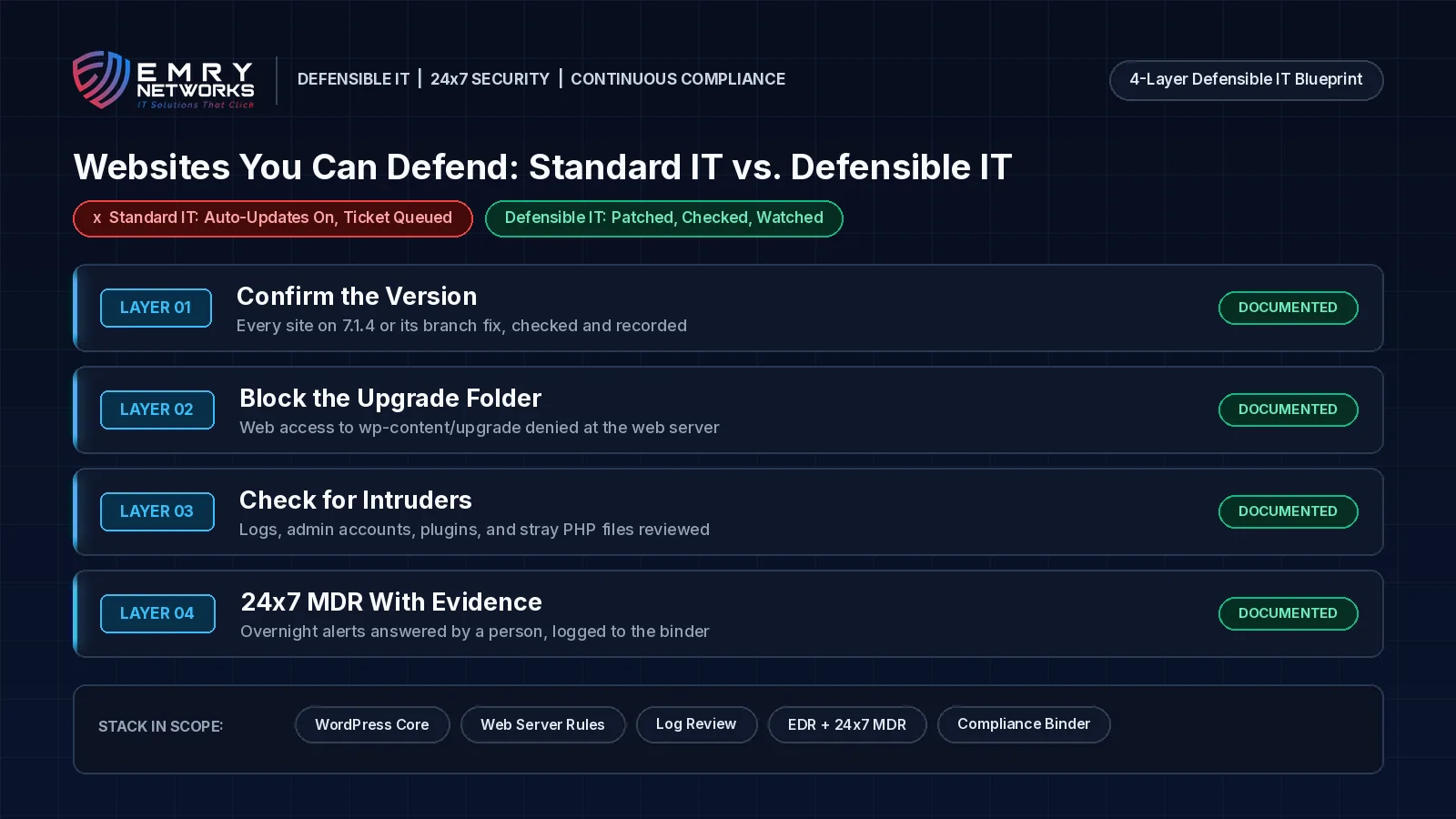
Standard IT vs. Defensible IT: 24x7 MDR or a business-hours ticket queue?
Standard IT patches the site when the ticket comes up. Defensible IT can show the site was fixed, checked, and watched.
Standard IT says "auto-updates are on." Defensible IT can show the version, the blocked folder, the log review, and who answered the overnight alert, with dates.
Standard IT looks like this:
- Auto-updates assumed to have worked, nobody checks the version.
- The website treated as the marketing agency's problem.
- Alerts land in a ticket queue reviewed during business hours.
- Patching counted as the finish line, with no check for intruders.
Defensible IT looks like this:
- Same-day critical updates on servers and websites, with the version confirmed and recorded, as part of compliance-first managed IT services.
- Every site, including agency-hosted ones, on one inventory with an owner.
- 24x7 managed detection and response, so a new admin account at 2 a.m. gets a human response that night.
- A compromise check after every exploited-flaw patch, recorded in an automatically updated compliance binder.
How does Emry Networks help regulated businesses in Jacksonville FL, Manchester NH, and nationwide?
Emry Networks provides managed IT, cybersecurity, and compliance services for medical and dental groups, law firms, financial advisors, defense contractors, and other regulated industries across the United States, from hubs in the Jacksonville, FL and Manchester, NH areas. We work on all-inclusive flat monthly pricing, so an overnight incident response does not bring a surprise invoice. Every engagement follows a 90-day blueprint:
- Phase 1 (Days 1-30): Scoping, a baseline gap assessment, and software deployment. We inventory every website, server, and cloud account, confirm versions, check what is exposed to the internet, and deploy EDR, logging, and device management.
- Phase 2 (Days 31-60): Tool implementation and policy authoring. We put patching timelines, web server hardening, MFA, and alert routing in place, and write policies that match what actually runs.
- Phase 3 (Days 61-90): Verification and a second gap assessment. We test that alerts reach a person at any hour, confirm fixes, and hand you before-and-after evidence.
Not sure your website is patched and watched? Book a 30-Minute Risk Assessment. We will review your websites, your patching, and who sees an alert after hours, and tell you plainly what we find. Prefer the phone? Call (603) 202-3200.
Next Steps for Your Business
- Take the free Compliance Readiness Assessment to see where you stand.
- Read our guide on which compliance framework applies to your business.
- Book a 30-Minute Risk Assessment with our team.
Frequently asked questions
What is CVE-2026-119977?
CVE-2026-119977 is a race condition in WordPress core updates. During a full core update, versions 4.7 through 7.1.3 unpack the new release into a predictable, web-accessible folder, which can let an attacker with no account run code on the server. Wordfence rates it CVSS 8.1, and CISA added it to the KEV catalog on November 3rd, 2026.
Which WordPress version fixes it?
WordPress 7.1.4, released on October 28th, 2026, fixes it. Fixed builds also exist for older branches, such as 7.0.8, 6.9.11, and 6.8.12. Sites on 4.6 and earlier get no security updates and should be upgraded or retired.
Are automatic updates enough?
Automatic updates help, but confirm the version on every site rather than assuming the update finished. Block web access to wp-content/upgrade, and check logs and admin accounts for signs of a break-in before the fix landed.
Does this affect HIPAA compliance?
If your website takes appointment requests, intake forms, or other patient information, a suspected compromise is a security incident under the HIPAA Security Rule. You need to investigate, respond, and document what you found.
Why does 24x7 monitoring matter for WordPress?
The attack lands while the site is updating, and background updates do not wait for business hours. 24x7 managed detection and response means an overnight alert, such as a new administrator account, gets a human response that night instead of the next business day.
Next steps
See how we help businesses in your industry, or book a short call to talk through where you stand today.
Read more from our team
Explore insights on compliance and security.

Ready to strengthen your compliance?
Get hands-on assessment and guidance from our compliance experts.